
Updating the DUPR Rating
An Admin is able to review a Customer’s DUPR rating inside their Customer Account
If inside the Customer’s Profile, the rating may state “Not Reliable” or “Not Rated”
This means the Customer’s account in DUPR’s system doesn’t have enough information to completely trust the rating
When a Customer does have a rating, say a rating of 3.5, which is visible inside the App, if the Customer believes their rating is different from what is visible, an Admin can go to the Customer’s Profile inside the Dashboard and refresh the connection with DUPR
To refresh the connection of the PodPlay system to DUPR’s APIs, the Admin would:
Navigate to the Customer’s Profile
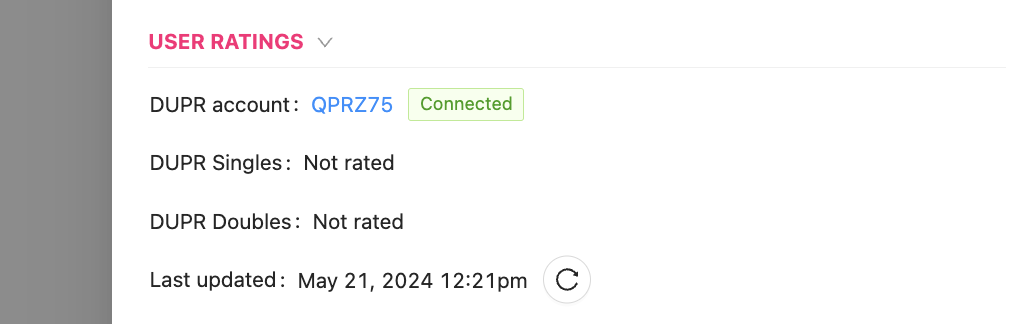
Scroll down to the USER RATINGS section
Click on the refresh/reload button with a circular arrow
This section also
Provides a link to the Customer’s DUPR profile
Provides the DUPR Singles and Doubles rating
Informs the Admin when the last time the DUPR API sent the PodPlay system an update on the Customer’s DUPR rating
The PodPlay system is reading the DUPR APIs for both the Customer’s regular DUPR ratings and the Customer’s provisional DUPR ratings
The regular DUPR ratings are a reliable rating which is based on many game and match scores recorded in the DUPR system
The provisional DUPR rating is a rating provided by a DUPR certified Coach, where a Coach has played with a Customer and can send their assessment to the DUPR system saying the Coach believes this Customer should be around X rating
To read more about DUPR provisional ratings, read the DUPR announcement here